eSIM compatible Apple devices

List of iOS devices compatible* with Pocket eSIM.

iPhone 17: 17 · 17 Pro · 17 Pro Max · Air
iPhone 16: 16 · 16 Plus · 16 Pro · 16 Pro Max · 16e
iPhone 15: 15 · 15 Plus · 15 Pro · 15 Pro Max
iPhone 14: 14 · 14 Plus · 14 Pro · 14 Pro Max
iPhone 13: 13 · 13 Mini · 13 Pro · 13 Pro Max
iPhone 12: 12 · 12 Mini · 12 Pro · 12 Pro Max
iPhone 11: 11 · 11 Pro · 11 Pro Max
iPhone SE: SE (2022) · SE (2020)
iPhone X: XR · XS · XS Max

Your device must be unlocked and the iOS version must be updated to 14.1 or newer. You can check with your carrier to see if there is anything you can do to unlock the eSIM in your device.

Notice: Device compatibility also varies from country to country. eSIM on the iPhone is not offered on the mainland of China. For example, iPhones XS, XS Max, and XR sold in China, Macau, and Hong Kong are not eSIM compatible (dual SIM phones with two physical SIM slots).

If you have a Turkish-produced device and it prevents you from installing our eSIM, please have your device restored to factory settings first according to the instruction mentioned here: https://support.apple.com/tr-tr/HT211023 (Turkish language) or https://support.apple.com/en-us/HT211023 (English language).

We are working on expanding this list as much as we can; we're committed to enabling anyone, anywhere, to stay connected.

eSIM-compatible Android phones and tablets

Android devices compatible with PocketEsim as of January, 2024

Samsung

Galaxy S25: S25 · S25+ · S25 Ultra · S25 Edge
Galaxy S24: S24 · S24+ · S24 Ultra
Galaxy S23: S23 · S23+ · S23 Ultra · S23 FE
Galaxy S22: S22 · S22+ · S22 Ultra
Galaxy S21: S21 · S21+ · S21 Ultra
Galaxy S20: S20 · S20+ · S20 Ultra (4G / 5G)
Galaxy Z Flip: Flip · Flip 3 · Flip 4 · Flip 5
Galaxy Z Fold: Fold · Fold 2 · Fold 3 · Fold 4 · Fold 5
Galaxy A: A23 5G · A35 · A36 · A54 · A55 · A56
Galaxy Note 20: Note 20 · Note 20 5G · Ultra · Ultra 5G

Google

Pixel 9: 9 · 9 Pro · 9 Pro XL · 9 Pro Fold · 9a
Pixel 8: 8 · 8 Pro · 8a
Pixel 7: 7 · 7 Pro · 7a
Pixel 6: 6 · 6 Pro · 6a
Pixel 5: 5 · 5a
Pixel 4: 4 · 4 XL · 4a · 4a 5G
Pixel 3: 3 · 3 XL · 3a · 3a XL
Pixel Fold: Fold

Huawei

P40: P40 · P40 Pro
Mate: Mate 40 Pro

Sony

Xperia 1: 1 V · 1 IV
Xperia 5: 5 IV
Xperia 10: 10 IV · 10 III Lite

Motorola

Edge 60: 60 · 60 Fusion · 60 Pro · 60 Stylus
Edge 50: 50 · 50 Fusion · 50 Neo · 50 Pro · 50 Ultra
Edge 40: 40 Neo · 40 Pro
Edge: 2022 · 2023 · 2024 · 2025 · Edge+
Razr 2025: Razr · Razr+ · Razr Ultra
Razr 2024: Razr · Razr+
Razr 60: 60 · 60 Ultra
Razr 50: 50 · 50 Ultra
Razr 40: 40 · 40 Ultra
Razr: 2022 · 5G · 2019
Moto G: G34 · G35 · G53 · G54 · G54 Power · G55 · G75 · G85
Moto G 2024: Moto G · Power · Stylus 5G
Moto G 2025: Moto G · Power
ThinkPhone: ThinkPhone 25

Nokia

Nokia: G60 · X30 · XR21

OnePlus

OnePlus: 11 · 12 · 13 · 13R · Open

Oppo

Find X: X8 · X8 Pro · X5 · X5 Pro · X3 Pro
Find N: N2 Flip
Reno: Reno A · Reno5 A · Reno6 Pro 5G · Reno9 A · Reno14 · Reno14 Pro
A Series: A55s 5G

Microsoft

Surface Duo: Duo · Duo 2
Surface Pro: Pro 9 · Pro X
Surface Go: Go 3

Honor

Honor: 90 · 200 · 200 Pro · 400 · 400 Lite · 400 Pro
Magic V: V2 · V3
Magic Vs: Vs · Vs3
Magic: 4 Pro · 5 Pro · 6 Pro · 6 Pro RSR · 7 Lite · 7 Pro

Xiaomi

Xiaomi: 12T Pro · 13 · 13 Lite · 13 Pro · 13T · 13T Pro · 14 · 14 Pro · 14T · 14T Pro · 15 · 15 Ultra
Redmi Note: 11 Pro 5G · 13 Pro · 13 Pro+ · 14 Pro · 14 Pro 5G · 14 Pro+ · 14 Pro+ 5G
Poco: Poco X7

Fairphone

Fairphone: 4 · 5

Sharp

AQUOS R: R6 · R7 · R8 · R8 Pro
AQUOS Sense: Sense 4 Lite · 6 · 7 · 8 · 9
AQUOS: Wish · Zero 6

Vivo

Vivo: V29 · V29 Lite 5G · X90 Pro · X100 Pro · X200 · X200 Pro

Rakuten

Rakuten: Big · Big S · Hand · Mini

TCL

TCL: 60 XE NxtPaper

Nuu

Nuu: Mobile X5

Hammer

Hammer: Blade 3 · Blade 5G · Explorer Pro

myPhone

myPhone: NOW eSIM

Gemini

Gemini: PDA 4G + Wi-Fi
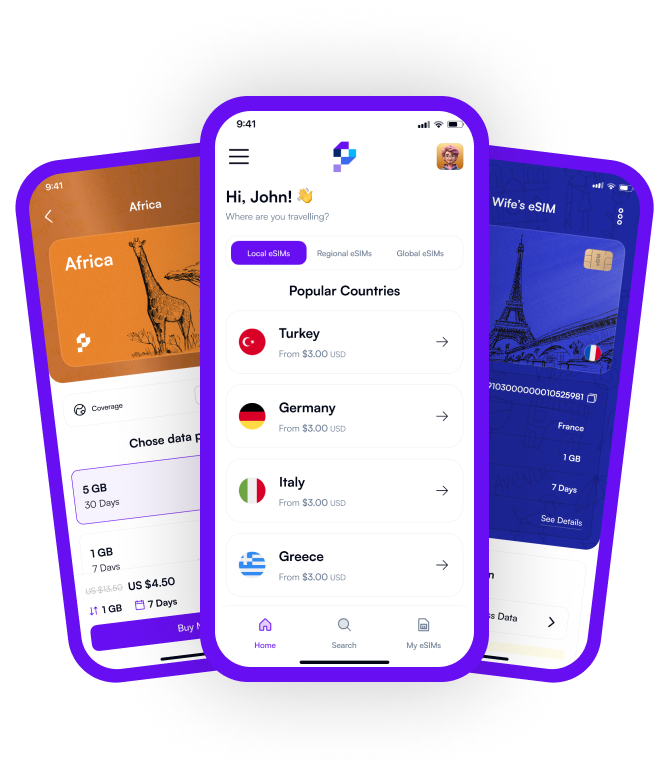
Download our App for Effortless eSIM Management

Discover the convenience of the Pocket app – effortlessly purchase, manage, and top up your eSIMs anytime, anywhere!

Pocket eSIM App Download Pocket eSIM App Download

Frequently Asked Questions

Welcome to Pocket eSIM your go-to destination for convenient and reliable eSIM solutions. Here are some frequently asked questions to help you navigate our platform and make the most out of your eSIM experience.

If you have additional questions or need personalized assistance, don't hesitate to contact our support team. Thank you for choosing Pocket eSIM for your eSIM needs!

Have more questions?

Can’t find the answer you’re looking for? Visit our help center.

Help Center
What is an eSIM?
An eSIM, or embedded SIM, is a small, programmable chip embedded in your device that allows you to activate a mobile plan without a physical SIM card. It enables seamless connectivity and flexibility for travelers and individuals seeking hassle-free mobile services.
How does PocketEsim.com work?
PocketEsim.com provides a platform for users to purchase and activate eSIMs for their devices. Simply browse our catalog, select the desired plan, and follow the easy activation process. Once activated, you'll enjoy instant connectivity without the need for a physical SIM card.
Which countries and networks do you support?
We offer eSIM plans for more than 200 countries and networks. Our catalog is continually expanding, so check our website for the latest updates. We strive to provide global coverage to ensure you stay connected wherever you go.
Is my device compatible with eSIM?
Most modern smartphones, tablets, and smartwatches are eSIM compatible. However, it’s important to check your device's specifications or visit our page for eSIM-compatible devices. We are here to help you make the right choice for your device. Compatibility.
How do I activate my eSIM?
The activation process is simple. After purchasing an eSIM plan, you can review the step-by-step activation guide that appears or is sent in the confirmation email. All you need to do is scan the QR code sent to your email or manually enter the activation details into your device. For more information, you can visit this page How It Works.
Can I keep my existing phone number?
Yes, you can keep your current phone number when switching to an eSIM plan. For more information, you can consult our support team or refer to the activation guide How It Works.
How can I manage my eSIM account?
Once your eSIM is activated, you can manage your account through our user-friendly online portal. Monitor data usage, extend plans, or make adjustments to your account settings at your convenience.
What happens if I change my device?
If you upgrade or change your device, you cannot transfer your eSIM to the new device. eSIM once activated it cannot be transferred or renewed. Please be careful not to delete it on your phone until the expire date.
What customer support is available?
Our customer support team is ready to assist you. Visit our support page for FAQs, guides, and troubleshooting tips. If you need further assistance, feel free to reach out via live chat, whatsapp or email, and we'll be happy to help.
How secure is the eSIM activation process?
We prioritize the security and privacy of your information. Our activation process follows industry-standard security measures to ensure a safe and secure experience for our users.
Can I get a refund for my eSIM?
If the eSIM cannot be installed or used due to a technical issue, you may request a refund within 30 days of the purchase date. (For more details, please review our Refund Policy page.)
Can I get a refund after installing the eSIM?
Yes. If the eSIM has been installed but no data has been used, you can request a full refund. (For more details, please review our Refund Policy page.)
Can I get a refund for unused data after the package expires?
No. Once the package validity period expires, refunds are not available for any remaining data. (For more details, please review our Refund Policy page.)
What should I do if I notice an incorrect charge?
If you believe there has been an incorrect charge, please contact our support team within 12 days of receiving the invoice. (For more details, please review our Refund Policy page.)
1